Reading-notes

Expressions and Operators
This chapter documents JavaScript expressions and the operators with which many of those expressions are built. An expression is a phrase of JavaScript that can be evaluated to produce a value.
### A constant embedded literally in your program is a very simple kind of expression. A variable name is also a simple expression that evaluates to whatever value has been assigned to that variable.
### Complex expressions are built from simpler expressions. An array access expression, for example, consists of one expression that evaluates to an array followed by an open square bracket, an expression that evaluates to an integer, and a close square bracket.
### Similarly, a function invocation expression consists of one expression that evaluates to a function object and zero or more additional expressions that are used as the arguments to the function.
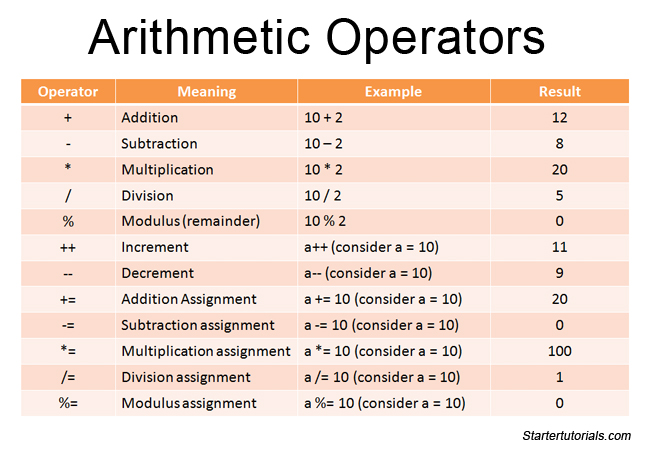
### The most common way to build a complex expression out of simpler expressions is with an operator. An operator combines the values of its operands (usually two of them) in some way and evaluates to a new value. The multiplication operator * is a simple example. The expression x * y evaluates to the product of the values of the expressions x and y. For simplicity, we sometimes say that an operator returns a value rather than “evaluates to” a value.
## Expressions
Any unit of code that can be evaluated to a value is an expression. Since expressions produce values, they can appear anywhere in a program where JavaScript expects a value such as the arguments of a function invocation. As per the MDN documentation, JavaScript has the following expression categories.
A function definition expression defines a JavaScript function, and the value of such an expression is the newly defined function. In a sense, a function definition expression is a “function literal” in the same way that an object initializer is an “object literal.” A function definition expression typically consists of the keyword function followed by a comma-separated list of zero or more identifiers (the parameter names) in parentheses and a block of JavaScript code (the function body) in curly braces.
Operators
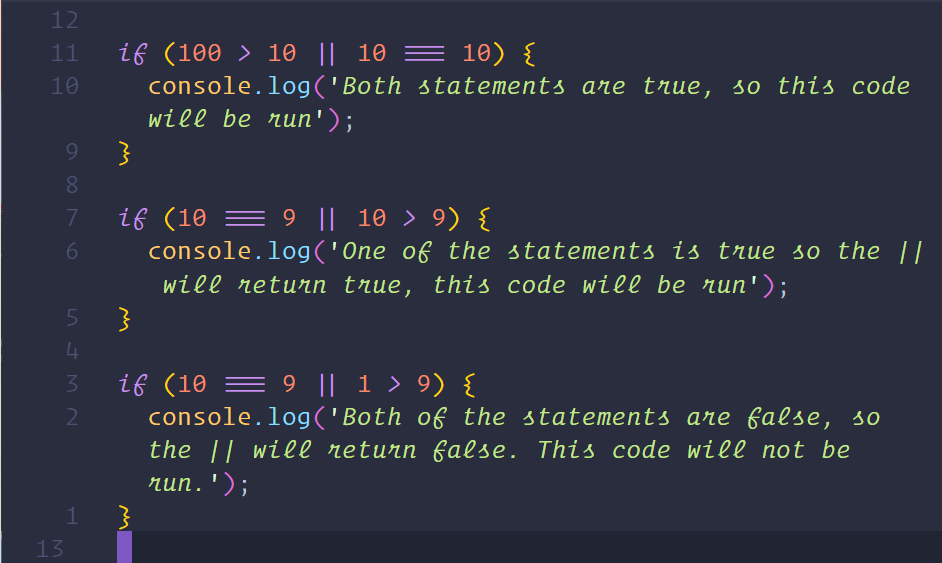
Operators are used for JavaScript’s arithmetic expressions, comparison expressions, logical expressions, assignment expressions, and more.
Note that most operators are represented by punctuation characters such as + and =. Some, however, are represented by keywords such as delete and instanceof. Keyword operators are regular operators, just like those expressed with punctuation; they simply have a less succinct syntax.
Operators can be categorized based on the number of operands they expect (their arity). Most JavaScript operators, like the * multiplication operator, are binary operators that combine two expressions into a single, more complex expression. That is, they expect two operands.
JavaScript also supports a number of unary operators, which convert a single expression into a single, more complex expression. The − operator in the expression −x is a unary operator that performs the operation of negation on the operand x. Finally, JavaScript supports one ternary operator, the conditional operator ?:, which combines three expressions into a single expression.
function
A function in JavaScript is similar to a procedure—a set of statements that performs a task or calculates a value, but for a procedure to qualify as a function, it should take some input and return an output where there is some obvious relationship between the input and the output
MDN Control Flow
JavaScript supports a compact set of statements, specifically control flow statements, that you can use to incorporate a great deal of interactivity in your application. This chapter provides an overview of these statements.
The JavaScript reference contains exhaustive details about the statements in this chapter. The semicolon (;) character is used to separate statements in JavaScript code.
Any JavaScript expression is also a statement. See Expressions and operators for complete information about expressions.